|
What is ForEachBox?
ForEachBox is a scripting and automation tool for various
Cisco devices. It supports the command line interface of the Cisco Nexus,
IOS and ASA series. It is implemented as a Java GUI and requires the Plink
tool that is included with PuTTY.
It features command macros, which allow Expect-Send clauses and dynamic
parameters in commands. Results can be saved to files or condensed in data collections.
|
|

|
Features
- Support for Cisco NX-OS, IOS, ASA-OS, ACE and WLAN-Controller,
- Also works on Unix/Linux systems and some other systems using a command line interface
- Support for Intermediate System (Jump Box) for access
- Various automation tools called macros and placeholder
- Macro Editor, allows easy use of macros
- Device output can be saved to logging files
- Gathered information can be saved to a CSV file
- Further information can be retrived from an external database file
- Jobs can be scheduled to run repetitivly at defined intervals
- Job definitions can be saved to and read from project files
|
|
click to see larger screenshot |
|
Usage:
ForEachBox is packed as a Java JAR file, which can be started by either double clicking
it in the file browser or by running the command "java -jar foreachbox.jar". Also available
is a Windows executeable, which is basically a wrapper and also sets some optimized
parameters for the Java VM. You need the JRE 1.4 or later installed on your machine to run it.
ForEachBox does not use a setup; just copy the file ForEachBox.jar to a working directory.
All generated logging and projects files are also stored in this directory by default.
ForEachBox requires one programm included in the Putty package, Plink. This program is used for the
actual SSH or Telnet connection to the device and is started as a hidden process.
Download and install the Putty package and copy the Plink binary into the same directory as the ForEachBox binary.
You can also select the binary from a different folder within the ForEachBox program
under the settings tab.
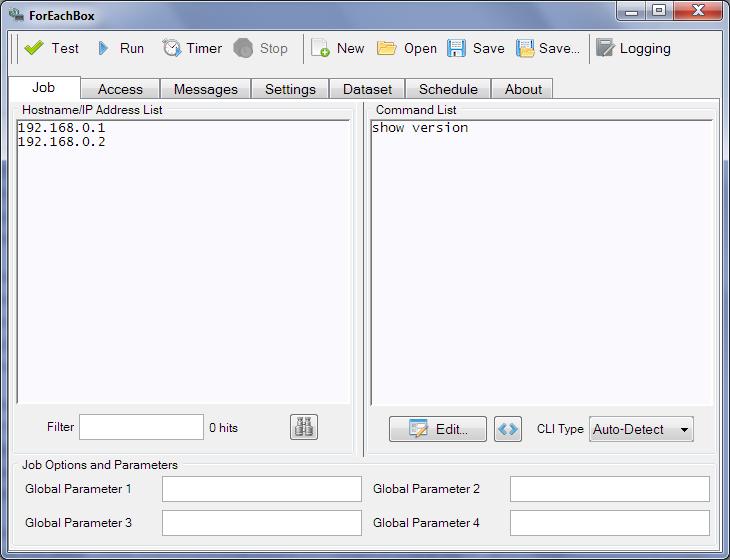
To get started with ForEachBox, enter the IP address or hostname of network devices, the commands
to send to the device and the user account to login to the device. The "Test" button allows
testing the settings on the first device in the list to see, if the settings work.
See the ForEachBox Docmentation
for more information.
For support forum and contact see the
BerliOS project page.
|
Disclaimer:
ForEachBox is an automation tool, which can change settings of many devices at one click.
Special care should be taken using this software and the test option be considered.
I shall not be held responsible for any harm or damage caused by this software,
including system or network outages, costs for restoring to a previous state or damage
to the management systems. This software is provides as-is, use at your own risk.
|
The following is the legal warning quote from the
PuTTY web site
LEGAL WARNING: Use of PuTTY, PSCP, PSFTP and Plink is illegal in countries where
encryption is outlawed. I believe it is legal to use PuTTY, PSCP, PSFTP and Plink
in England and Wales and in many other countries, but I am not a lawyer and so if
in doubt you should seek legal advice before downloading it. You may find this site
useful (it's a survey of cryptography laws in many countries) but I can't vouch for its correctness.
|
|
Downloads:
ForEachBox Setup Plink, Java file and documentation; Installer for Windows
ForEachBox complete package Plink, Java file and documentation; download for Linux and OS X (660kB)
ForEachBox Java application Version 2.0.3 (230kB)
ForEachBox Windows executeable Version 2.0.3 (270kB)
ForEachBox Docmentation in PDF format (1.2MB)
Plink 0.63 executeable only (160kB)
|
|
License:
ForEachBox is copyright 2013 Volker Semken.
Permission is hereby granted, free of charge, to any person obtaining a copy of this software
and associated documentation files (the "Software"), to deal in the Software without restriction,
including without limitation the rights to use, copy, modify, merge, publish, distribute,
sublicense, and/or sell copies of the Software, and to permit persons to whom the Software
is furnished to do so, subject to the following conditions:
The above copyright notice and this permission notice shall be included in all copies or
substantial portions of the Software.
THE SOFTWARE IS PROVIDED "AS IS", WITHOUT WARRANTY OF ANY KIND, EXPRESS OR IMPLIED, INCLUDING
BUT NOT LIMITED TO THE WARRANTIES OF MERCHANTABILITY, FITNESS FOR A PARTICULAR PURPOSE AND
NONINFRINGEMENT. IN NO EVENT SHALL SIMON TATHAM BE LIABLE FOR ANY CLAIM, DAMAGES OR OTHER
LIABILITY, WHETHER IN AN ACTION OF CONTRACT, TORT OR OTHERWISE, ARISING FROM, OUT OF OR IN
CONNECTION WITH THE SOFTWARE OR THE USE OR OTHER DEALINGS IN THE SOFTWARE.
Trademarks
Cisco® and IOS® are registered trademarks or trademarks of
Cisco Systems, Inc. and/or its affiliates in the United States and certain other countries.
Windows is a registered trademark of Microsoft Corporation in the
United States and other countries.
Linux is a registered trademark of Linus Torvalds.
Apple and OS X are trademarks of Apple Inc., registered in the U.S. and other countries.
Oracle and Java are registered trademarks of Oracle and/or its affiliates.
Other names may be trademarks of their respective owners.
Images used for ForEachBox Farm-Fresh Web Icons unter
Creative Commons
|